PixelPondProjects

Software for the way
your company works.

We build websites, tools for managing servers, and software for engineering teams. Explore the working projects behind those capabilities.

Explore our work

Project SYS.

Server management / Customer services / Formerly MegaTool

Working app

Know your systems.
Keep the context.

Keep machine records, customer access, database work, and maintenance history together. A workspace for the people responsible for keeping systems running.

Open Project SYS (opens in a new tab)

Self-hosted · Account required

FLEET

See what’s running.

Linux inventory, health monitoring, maintenance windows, and website checks.

ACCESS

Give customers the right access.

Assigned services and per-machine browser SSH, with separate customer credentials.

DATA

Keep data and recovery connected.

Database administration, customer database accounts, and scheduled encrypted backups.

Inside the build
  • Client and machine records with human work logs and audit history.
  • Linux inventory, health checks, and approved Debian/Ubuntu package updates.
  • Customer accounts, assigned services, support requests, and explicit machine-access grants.
  • PostgreSQL, MySQL, and MariaDB administration and customer database provisioning.
  • Scheduled encrypted database and directory backups.

A working self-hosted app with invitation-based customer access. Customer browser SSH is recorded with notice. Hosting checkout and automatic server provisioning are separate integration work.

From equipment records
to work in the field.

Software for engineering and operations teams: connect equipment, configuration, testing, and handover evidence to the work being done.

Data Center Delivery Hub

Equipment · Drawings · Commissioning

Trace an equipment record through a schematic, network map, and 3D model. Connect field work, readiness gates, sign-off, and handover evidence in the same project workspace.

Build notes
  • Shared equipment records across schematics, network views, and a 3D model.
  • Work packages, readiness gates, sign-off, and handover evidence.
  • Project permissions and a guided live presentation.

A working demonstration foundation; organization-specific validation is still needed before rollout.

Workflow prototype

AutoABB

ABB D-50 · BCM modules

Discover connected modules, match them to a panel blueprint, review configuration changes, and record the deployment. A guided desktop workflow for equipment configuration.

Build notes
  • Connected-module discovery and blueprint matching.
  • Configuration previews, template uploads, and device ID assignment.
  • Deployment reports, circuit readings, and step-by-step guidance.

Hardware operations depend on the connected equipment and the reviewed panel configuration.

Desktop tool

Commissioning Tools

Raptor Cortex · Moxa · EPMS

A shared collection of device configuration utilities and an EPMS commissioning dashboard, built around specific equipment and field workflows.

Build notes
  • Raptor Cortex configuration utilities.
  • Moxa configuration tooling.
  • An EPMS commissioning dashboard in a shared project collection.

A field-tool codebase with workflows tied to specific equipment.

Tool collection

Websites and portals,
with the tools behind them.

Visual editing, structured content, customer-facing tools, and the administration to support them. These projects show what we can build around a company’s workflow.

PixeSites

Visual website builder

Working local app

Editable websites.
A clear handoff.

Build pages visually, reuse sections, and connect selected content. Export a standalone website or a Python-backed site with forms and editable collections.

What’s built
  • Multi-page editing, responsive layouts, reusable sections, and project backups.
  • Configurable galleries, searchable lists, tabs, calculators, and 3D elements.
  • Contact forms and a submission inbox in Python-backed exports.
  • Local content collections and selected-field database sections.
  • Static and Python export formats with editable project handoff.

A local, single-user builder. Private-data sites need appropriate authentication; deployment into Project SYS still requires integration and host setup.

Design
Pages, sections & responsive styles
Content
Forms & editable collections
Handoff
Exported files & editable projects

ProjectPyPython Path

Working app

Write the code.
See what it does.

A learning platform with structured lessons, guided exercises, and an in-browser Python runner. Accounts and progress tracking support a complete learning workflow.

Visit Python Path (opens in a new tab)
Curriculum & build notes
  • Seven authored Python foundation lessons, debugging practice, and a capstone.
  • Browser code execution with run, stop, and reset controls.
  • Accounts, progress tracking, and an editorial admin.
  • A course catalog spanning Python, Ladder Logic, and Structured Text.

Advanced tracks remain upcoming. Payment integration is implemented but not activated for live purchases.

  • PythonFoundation lessons & a capstone
  • Ladder LogicReleased in the local curriculum
  • Structured TextFoundations available
Hearthwood promotional artwork showing a block-style village in a mountain valley
Original project artwork · Not a server screenshot

Community website + applications portal

Hearthwood

Give your Minecraft community a home, then give the team a way to manage the people who want to help run it.

A configurable website, staff applications, reviewer permissions, and read-only demos, packaged as one two-product kit.

Packaged kit
What’s in the kit
  • A five-view Minecraft community website with an owner dashboard.
  • A staff portal with configurable roles, questions, applicant tracking, and reviewer permissions.
  • Read-only demos and a two-product installation bundle.

The separate Tebex theme is not included in the verified bundle. Marketplace release remains pending.

Explore the website demo (opens in a new tab)

Nexus Hosting

Hosting storefront · Server configurator

Choose a game, memory tier, region, and billing period. Review the configuration and price, with owner-managed settings and a matching Pterodactyl theme package.

Build notes
  • Game, memory, region, and billing selections with a live price summary.
  • Saved storefront settings with publication history.
  • WHMCS checkout mapping and a matching Pterodactyl theme package.

Billing requires the owner's WHMCS configuration. Panel theme installation still needs staging verification.

Working storefront

We build beyond
business software, too.

Our original co-op games show another side of the work: multiplayer systems, custom 3D rendering, and complete playable experiences.

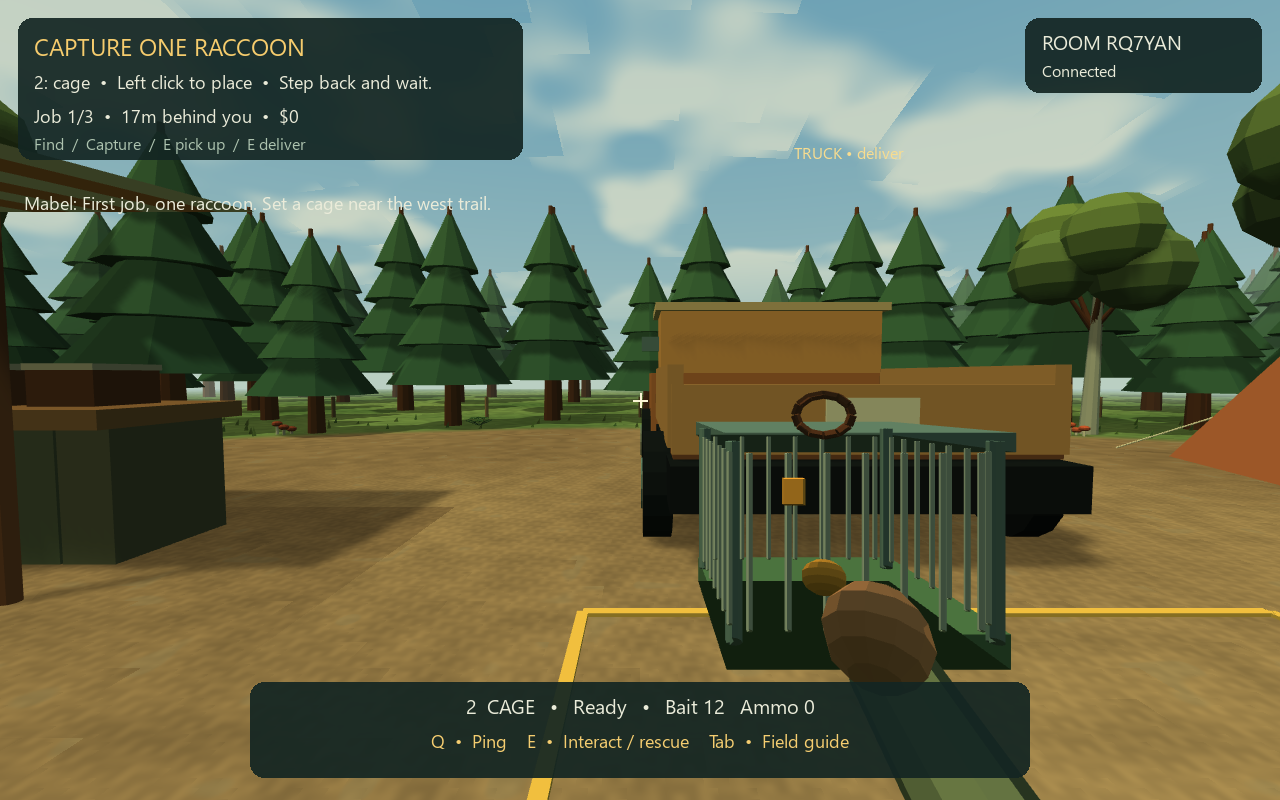
A captured raccoon at the woodland camp in How to Hunt
How to HuntActual gameplay · Windows build

Online co-op · 1–4 players

How to Hunt

Bring them back alive.

Take a wildlife contract, pack your equipment, and head into the woods. Capture and deliver animals together—and be ready when the Goosefather shows up.

Playable build
What’s playable
  • Solo and online expeditions with private room codes and public lobbies.
  • An authoritative game server, saved campaigns, and a packaged Windows client.
  • 27 original stylized models, synthesized audio, equipment, wildlife, and a rare boss encounter.

A runnable first edition. Wider hardware coverage and a two-home-network human playtest remain acceptance steps.

Solo & LAN co-op · 1–4 players

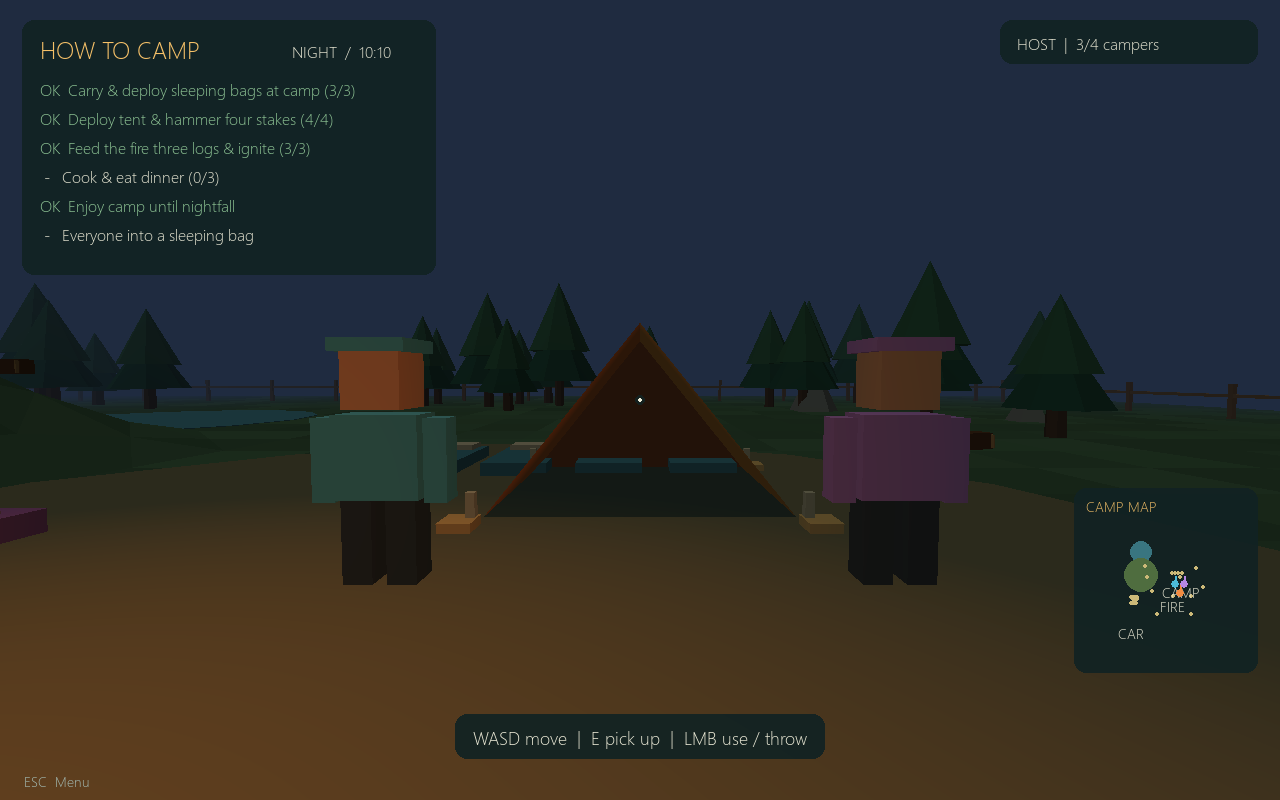
How to Camp

The tent was the easy part.

Unload the car, cook dinner, and try to get everyone into bed. Wind, runaway food, and an overinflated air mattress have other plans.

Playable build
What’s playable
  • A complete camping loop, from unloading supplies to sleeping under the stars.
  • Shared physics, runaway food, wind-blown tents, and an overinflating mattress.
  • Solo play, host-and-join multiplayer, original synthesized sound, and Windows packaging.

Designed for solo or LAN play. Remote hosting requires network setup; late joining and host migration are not included.

Two friends beside their tent at night in How to Camp
How to CampActual gameplay · Windows build

Personal projects.
Practical ideas.

Smaller applications for daily habits and shared memories, with the same attention to useful workflows.

Neutrition

Private app

A mobile-friendly diary for meals, macros, water, and personal targets. Scan a nutrition label, review the numbers, and save the entry.

Saved meals · Weekly insights · 48 recipe ideas

Build notes
  • Food logging, editable targets, serving math, saved meals, and weekly trends.
  • On-device nutrition-label OCR and barcode lookup with review before saving.
  • A recipe collection with preferences and ingredient filters.
  • An installable home-screen experience and private saved records.

Apple Health is not connected. Physical iPhone installation and camera scanning still need device testing.

Between Us

Private app

Collect photos, captions, and personal notes in a private album. Read it together, or export a square-format PDF to keep.

Swipeable albums · Scrapbook layouts · PDF export

Build notes
  • Photo uploads, covers, captions, reordered moments, and personal notes.
  • A swipeable album reader and square-format PDF exports.
  • Password-protected albums and optional AI-assisted note drafts.

Google Photos importing requires the owner's OAuth setup and live authorization verification.

The complete collection

12 projects. Explore the work and where each project stands.

  1. Project SYS
  2. Data Center Delivery Hub
  3. AutoABB
  4. Commissioning Tools
  5. PixeSites
  6. ProjectPy / Python Path
  7. Hearthwood
  8. Nexus Hosting
  9. How to Hunt
  10. How to Camp
  11. Neutrition
  12. Between Us